iotPush API documentation
Everything you need to send notifications and handle responses.
Connecting an AI agent? The iotPush MCP server lets Claude Code, Cursor and other MCP clients notify you or ask you and wait for your answer.
Quick Start
Create a topic in your dashboard, then send your first notification:
# Send a plain-text push
curl -d "Hello from my Pi!" https://www.iotpush.com/api/push/my-topic
https://www.iotpush.com/...Three URL forms will appear to "almost work" but silently fail with"Redirecting..." — see Troubleshooting below for details.
http://...→ 308 redirect to https; curl drops POST body by defaultiotpush.com/...(apex, no www) → 307 redirect to www; same problemiotpush.com/your-topic(no/api/push/) → wrong path entirely
Troubleshooting — "Redirecting..."
If your curl command prints Redirecting... and no notification arrives, your URL is triggering an HTTP redirect that silently drops the POST body. This is the single most common integration issue. Here's how to diagnose and fix it.
Why it happens
By default, curl does not follow redirects, and even with -L it converts POST to GET on 301/302 unless you also pass --post301 --post302 --post307. The same gotcha exists in many Arduino / ESP32 HTTP libraries, older Python requests versions, and some webhook platforms. The cleanest fix is to never trigger a redirect in the first place.
Cause matrix
| URL you used | What the server does | Outcome |
|---|---|---|
| http://www.iotpush.com/api/push/my-topic | 308 → https://www.iotpush.com/... | curl prints "Redirecting..." and stops |
| http://iotpush.com/api/push/my-topic | 308 → https → 307 → www (two hops) | Body dropped on hop 2, even with -L |
| https://iotpush.com/api/push/my-topic | 307 → https://www.iotpush.com/... | Body dropped unless --post307 is set |
| iotpush.com/your-topic (no /api/push/) | Path doesn't exist | 404 / wrong route |
| https://www.iotpush.com/api/push/my-topic | Direct hit — no redirect | ✅ 200 OK, notification delivered |
Diagnose your own request
Run with -v to see the redirect chain, or --fail-with-body to surface real error responses:
# See exactly what the server returned (headers + body)
curl -v -d "test" https://www.iotpush.com/api/push/my-topic

# Treat 4xx/5xx as errors but still print the response body
curl --fail-with-body -sS \
     -d "test" \
     https://www.iotpush.com/api/push/my-topic
If you cannot change the URL
(e.g. legacy device, hard-coded webhook). Tell curl to follow redirects andpreserve the POST body across all redirect codes:
curl -L --post301 --post302 --post307 --post308 \
     -d "Hello from my Pi!" \
     http://iotpush.com/api/push/my-topic
Other common errors
| Status | Body | Fix |
|---|---|---|
| 404 | Topic "X" not found | Create the topic in your dashboard first |
| 401 | Invalid API key | Check the Authorization: Bearer token for private topics |
| 405 | Method Not Allowed | Use POST, not GET — push endpoints only accept POST |
| 429 | Rate limit exceeded | You hit your monthly cap; upgrade or wait |
Send Notification
POST /api/push/{topic}Send a push notification to all subscribers of a topic. Accepts plain text or a JSON body. Private topics require an Authorization header with the topic API key.
Authentication (private topics)
# Bearer token = your topic API key
Authorization: Bearer YOUR_TOPIC_API_KEY
JSON Body Fields
| Field | Type | Required | Description |
|---|---|---|---|
| message | string | Yes | The notification body text |
| title | string | No | Notification title shown in bold |
| priority | string | No | low · normal (default) · high · urgent |
| tags | string | No | Comma-separated tags, e.g. "sensor,alert" |
| click_url | string | No | URL to open when the notification is tapped |
| actions | array | No | Interactive action buttons (see Action Buttons) |
| callback_url | string | No | Webhook URL called when an action is tapped |
Header Shortcuts
When sending plain text you can pass fields as HTTP headers instead of JSON.
| Header | Description | Example |
|---|---|---|
| Title | Notification title | Alert! |
| Priority | low, normal, high, urgent | high |
| Tags | Comma-separated tags | warning,sensor |
| Click | URL to open on tap | https://... |
Response
{
  "success": true,
  "id": "31d902cf-...",        // message ID
  "receipt_id": "b06e8c90-...", // use to poll delivery status
  "topic": "my-topic",
  "timestamp": "2026-04-10T00:06:01Z",
  "subscribers": 8
}
Examples
Simple:
curl -d "Sensor triggered!" https://www.iotpush.com/api/push/my-topic
With headers:
curl -H "Title: Alert" -H "Priority: high" \
     -d "Temperature exceeded 80°C" \
     https://www.iotpush.com/api/push/my-topic
JSON body:
curl -H "Content-Type: application/json" \
     -d '{"title":"Alert","message":"Temp high!","priority":"high"}' \
     https://www.iotpush.com/api/push/my-topic
Private topic (with API key):
curl -H "Authorization: Bearer YOUR_TOPIC_API_KEY" \
     -H "Title: Alert" \
     -d "Sensor triggered!" \
     https://www.iotpush.com/api/push/my-topic
Tip — see real errors instead of silent failures:
curl --fail-with-body -sS \
     -d "Sensor triggered!" \
     https://www.iotpush.com/api/push/my-topic
Language Examples
Python:
import requests
requests.post(
    "https://www.iotpush.com/api/push/my-topic",
    data="Hello from Python!",
    headers={"Title": "Python Alert"}
)
JavaScript / Node.js:
fetch("https://www.iotpush.com/api/push/my-topic", {
  method: "POST",
  body: "Hello from JS!",
  headers: { "Title": "JS Alert" }
});
Arduino / ESP32:
#include <HTTPClient.h>
HTTPClient http;
http.begin("https://www.iotpush.com/api/push/my-topic");
http.addHeader("Title", "ESP32 Alert");
http.POST("Sensor value: " + String(sensorValue));
http.end();Delivery Receipts
Every notification returns a receipt_id. Use receipts to track delivery, read, and action status.
Get a receipt
GET /api/receipts/{receipt_id}Auth: Authorization: Bearer USER_SESSION_TOKEN or X-Api-Key: TOPIC_API_KEY
{
  "receipt_id": "b06e8c90-...",
  "message_id": "31d902cf-...",
  "topic_id":   "...",
  "status":     "acted",          // queued · delivered · read · acted · expired · failed
  "delivered_count": 3,
  "read_count":      2,
  "acted_count":     1,
  "actions_taken": [
    {
      "action_id":    "approve",
      "action_label": "Approve",
      "reply_text":   null,
      "device_name":  "Vincent's iPhone",
      "acted_at":     "2026-04-10T00:10:22Z"
    }
  ],
  "created_at": "2026-04-10T00:06:01Z",
  "updated_at": "2026-04-10T00:10:22Z"
}
List receipts
GET /api/receiptsQuery Parameters
| Param | Description |
|---|---|
| topic_id | Filter to a single topic |
| status | queued · delivered · read · acted · expired · failed |
| since | ISO 8601 timestamp — only return receipts after this time |
| cursor | Pagination cursor (created_at of last item) |
| limit | Max results per page (default 50, max 100) |
curl -H "Authorization: Bearer YOUR_SESSION_TOKEN" \
     "https://www.iotpush.com/api/receipts?status=acted&limit=10"
Report Action
Called automatically by the iotpush mobile app when a user taps an action button. You can also call this from your own client to mark an action as taken.
POST /api/actionAuth: Authorization: Bearer USER_SESSION_TOKEN
Request Body
| Field | Type | Required | Description |
|---|---|---|---|
| message_id | string | Yes | ID of the message the action belongs to |
| action_id | string | Yes | ID of the action that was tapped |
| reply_text | string | No | Text entered by user for reply-type actions |
| device_id | string | No | Device ID for attribution |
curl -X POST https://www.iotpush.com/api/action \
     -H "Authorization: Bearer USER_SESSION_TOKEN" \
     -H "Content-Type: application/json" \
     -d '{
  "message_id": "31d902cf-...",
  "action_id":  "approve",
  "reply_text": null
}'
Webhooks
Receive real-time HTTP callbacks when events occur on your topics — action taken, message delivered, read, or expired. Up to 10 webhooks per account.
Create a webhook
POST /api/webhooks| Field | Type | Required | Description |
|---|---|---|---|
| url | string | Yes | HTTPS endpoint to receive events |
| events | string[] | Yes | action · delivered · read · expired · all |
| topic_ids | string[] | No | Limit to specific topics (empty = all topics) |
curl -X POST https://www.iotpush.com/api/webhooks \
     -H "Authorization: Bearer USER_SESSION_TOKEN" \
     -H "Content-Type: application/json" \
     -d '{
  "url":    "https://your-server.com/hooks/iotpush",
  "events": ["action", "delivered"]
}'
Other webhook endpoints
| Method | Path | Description |
|---|---|---|
| GET | /api/webhooks | List all your webhooks |
| PATCH | /api/webhooks/{id} | Update url, events, active, or topic_ids |
| DELETE | /api/webhooks/{id} | Delete a webhook |
| POST | /api/webhooks/{id}/test | Send a test event to the webhook URL |
Webhook Payload (action event)
{
  "event":      "action",
  "message_id": "31d902cf-...",
  "topic":      "my-topic",
  "action_id":  "approve",
  "action_label": "Approve",
  "reply_text": null,
  "device_name": "Vincent's iPhone",
  "acted_at":   "2026-04-10T00:10:22Z"
}
n8n Example: Approval Workflow
Works on every plan
Action buttons and the callback_url work on Free, Team and Pro. Monthly push, approval and topic limits differ by plan — see pricing.
A complete human-in-the-loop approval: n8n pushes a question to your phone, you tap Approve or Reject, and iotpush calls a webhook back into n8n so the workflow resumes down the branch you chose. Nothing is deployed until a human taps.
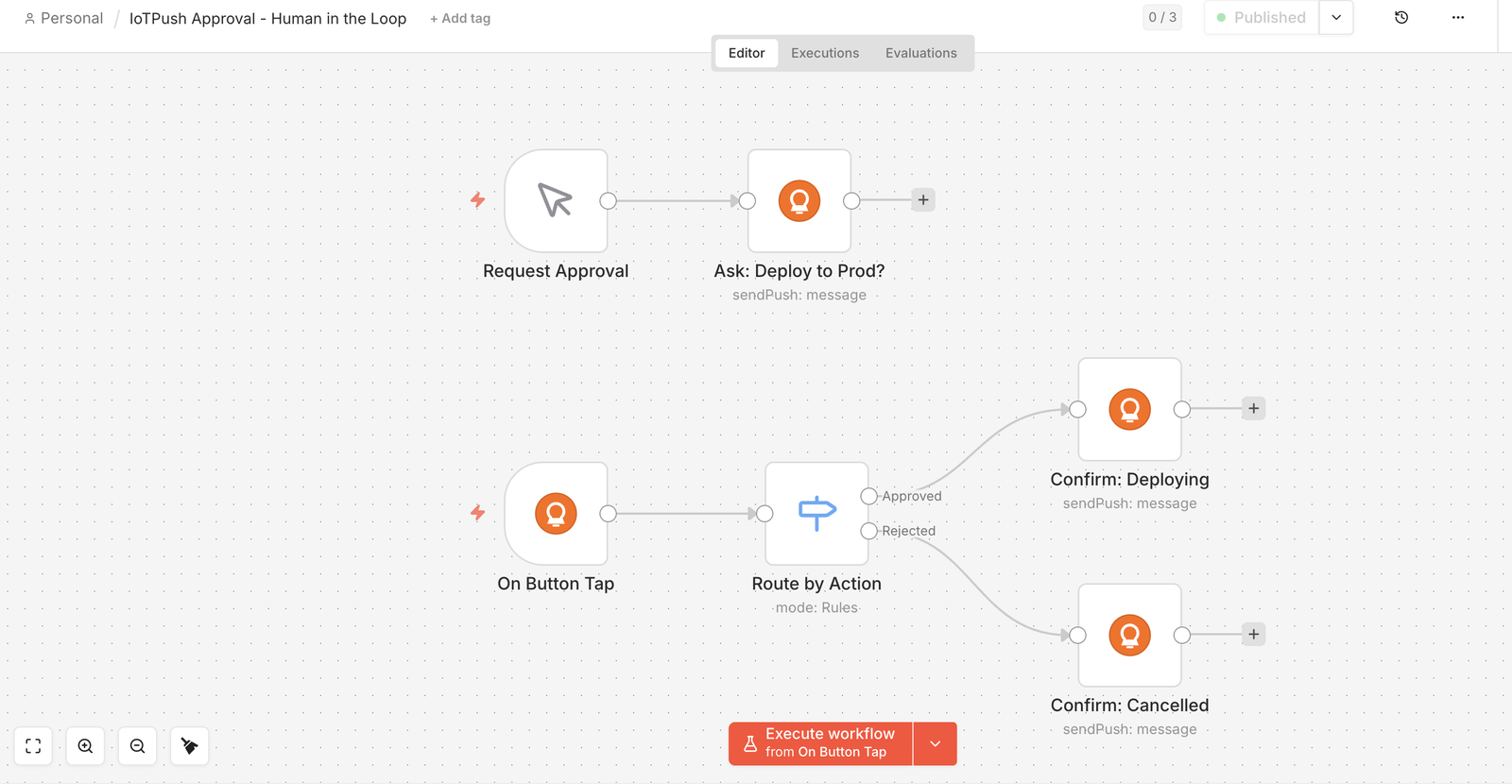
Two independent branches. The top one asks; the bottom one runs when the button is tapped, possibly minutes or hours later.
How it works
- Ask. The
IoTPushnode sends a push carrying anactionsarray and acallback_url. - Tap. The buttons render on the notification and on the message card in the app. Tapping one records the action and fires a
POSTto yourcallback_url. - Resume. The
IoTPush Triggernode receives that POST, and aSwitchon{{ $json.actionId }}routes to the Approved or Rejected branch.
1. What the push looks like
The n8n node builds this for you, but this is the raw request — anything that can POST JSON can do the same thing.
curl -X POST https://www.iotpush.com/api/push/YOUR_TOPIC \
     -H "Content-Type: application/json" \
     -d '{
  "title":   "Deploy approval needed",
  "message": "Build 2.3.0 passed CI. Deploy to production?",
  "priority": "high",
  "actions": [
    { "id": "approve", "label": "Approve" },
    { "id": "reject",  "label": "Reject", "destructive": true }
  ],
  "callback_url": "https://your-n8n-host/webhook/<trigger-id>/webhook",
  "callback_headers": { "X-Callback-Token": "YOUR_SHARED_SECRET" }
}'
2. What iotpush POSTs back
When a button is tapped, this body is delivered to your callback_url, with any callback_headers attached so you can verify it came from you.
{
  "event":        "action",
  "receipt_id":   "9f1c2a44-...",
  "message_id":   "31d902cf-...",
  "topic_id":     "0b7e5d18-...",
  "action":       "approve",
  "action_label": "Approve",
  "reply":        null,
  "user_id":      "a04f...",
  "device":       "Vincent's iPhone",
  "timestamp":    "2026-07-31T18:22:07.412Z"
}
The IoTPush Trigger node normalises this to actionId, actionLabel, reply, messageId, device and timestamp, and keeps the untouched body under raw.
3. Import the workflow
Install the n8n-nodes-iotpush community node first (Settings → Community nodes), then paste this into n8n via Workflows → Import from Clipboard.
{
  "name": "IoTPush Approval - Human in the Loop",
  "nodes": [
    {
      "parameters": {},
      "id": "26defd5f-7a33-4eb9-ae31-e5066cc84aa0",
      "name": "Request Approval",
      "type": "n8n-nodes-base.manualTrigger",
      "typeVersion": 1,
      "position": [0, 0]
    },
    {
      "parameters": {
        "topic": "YOUR_TOPIC",
        "message": "Build 2.3.0 passed CI. Deploy to production?",
        "additionalFields": {
          "title": "Deploy approval needed",
          "priority": "high",
          "tags": "deploy,approval",
          "callbackUrl": "PASTE_THE_TRIGGER_PRODUCTION_URL_HERE"
        },
        "actionsUi": {
          "action": [
            {
              "id": "approve",
              "label": "Approve"
            },
            {
              "id": "reject",
              "label": "Reject"
            }
          ]
        },
        "callbackHeadersUi": {
          "header": [
            {
              "name": "X-Callback-Token",
              "value": "YOUR_SHARED_SECRET"
            }
          ]
        },
        "requestOptions": {}
      },
      "id": "b817c9f3-45c7-4528-8d90-ec89ff71a84c",
      "name": "Ask: Deploy to Prod?",
      "type": "n8n-nodes-iotpush.ioTPush",
      "typeVersion": 1,
      "position": [224, 0]
    },
    {
      "parameters": {
        "actionIds": "approve,reject",
        "options": {
          "secretHeader": "X-Callback-Token",
          "secretValue": "YOUR_SHARED_SECRET",
          "ignoreTest": false
        }
      },
      "id": "2b57b32e-bb2e-4ee7-8855-0b9595ee7233",
      "name": "On Button Tap",
      "type": "n8n-nodes-iotpush.ioTPushTrigger",
      "typeVersion": 1,
      "position": [0, 288]
    },
    {
      "parameters": {
        "rules": {
          "values": [
            {
              "conditions": {
                "options": {
                  "caseSensitive": true,
                  "leftValue": "",
                  "typeValidation": "strict",
                  "version": 3
                },
                "conditions": [
                  {
                    "leftValue": "={{ $json.actionId }}",
                    "rightValue": "approve",
                    "operator": {
                      "type": "string",
                      "operation": "equals"
                    },
                    "id": "fb55fd20-16fe-4de1-9234-87dc1a359dfb"
                  }
                ],
                "combinator": "and"
              },
              "renameOutput": true,
              "outputKey": "Approved"
            },
            {
              "conditions": {
                "options": {
                  "caseSensitive": true,
                  "leftValue": "",
                  "typeValidation": "strict",
                  "version": 3
                },
                "conditions": [
                  {
                    "leftValue": "={{ $json.actionId }}",
                    "rightValue": "reject",
                    "operator": {
                      "type": "string",
                      "operation": "equals"
                    },
                    "id": "f8fc9277-2746-46ac-b251-19a53bbe68d7"
                  }
                ],
                "combinator": "and"
              },
              "renameOutput": true,
              "outputKey": "Rejected"
            }
          ]
        },
        "options": {
          "fallbackOutput": "none"
        }
      },
      "id": "1a9e6e25-7508-4fbc-b892-8ca03dda32de",
      "name": "Route by Action",
      "type": "n8n-nodes-base.switch",
      "typeVersion": 3.4,
      "position": [240, 288]
    },
    {
      "parameters": {
        "topic": "YOUR_TOPIC",
        "message": "=Approved from {{ $json.device }} at {{ $json.timestamp }}. Deploying 2.3.0 now.",
        "additionalFields": {
          "title": "Deploy approved",
          "priority": "normal",
          "tags": "deploy,approved"
        },
        "requestOptions": {}
      },
      "id": "d0a998dd-849a-4d20-875a-3ac8e842efd0",
      "name": "Confirm: Deploying",
      "type": "n8n-nodes-iotpush.ioTPush",
      "typeVersion": 1,
      "position": [528, 192]
    },
    {
      "parameters": {
        "topic": "YOUR_TOPIC",
        "message": "=Rejected from {{ $json.device }}. Deploy cancelled, nothing shipped.",
        "additionalFields": {
          "title": "Deploy rejected",
          "priority": "normal",
          "tags": "deploy,rejected"
        },
        "requestOptions": {}
      },
      "id": "5e182386-d07e-4442-80ed-9f308212becf",
      "name": "Confirm: Cancelled",
      "type": "n8n-nodes-iotpush.ioTPush",
      "typeVersion": 1,
      "position": [528, 400]
    }
  ],
  "connections": {
    "Request Approval": {
      "main": [
        [
          {
            "node": "Ask: Deploy to Prod?",
            "type": "main",
            "index": 0
          }
        ]
      ]
    },
    "On Button Tap": {
      "main": [
        [
          {
            "node": "Route by Action",
            "type": "main",
            "index": 0
          }
        ]
      ]
    },
    "Route by Action": {
      "main": [
        [
          {
            "node": "Confirm: Deploying",
            "type": "main",
            "index": 0
          }
        ],
        [
          {
            "node": "Confirm: Cancelled",
            "type": "main",
            "index": 0
          }
        ]
      ]
    }
  },
  "settings": {
    "executionOrder": "v1"
  }
}
After importing — three things to set
- Replace every
YOUR_TOPICwith your own topic name, and select your iotpush credential on the three IoTPush nodes. - Open On Button Tap, copy its Production URL, and paste it into the Callback URL field of Ask: Deploy to Prod? (replacing
PASTE_THE_TRIGGER_PRODUCTION_URL_HERE). - Replace both copies of
YOUR_SHARED_SECRETwith the same random string. The trigger rejects any POST whoseX-Callback-Tokenheader does not match.
Activate the workflow before testing — the Production URL only accepts requests while the workflow is active. The Test URL listens for a single execution only.
Devices
Register and manage push notification devices. The mobile app calls this automatically on login.
Register a device
POST /api/devices| Field | Type | Required | Description |
|---|---|---|---|
| push_token | string | Yes | Expo push token (ExponentPushToken[...]) |
| platform | string | Yes | ios · android · web |
| device_name | string | No | Human-readable name, e.g. "Vincent's iPhone" |
| app_version | string | No | App version string, e.g. "1.1.1" |
List devices
GET /api/devicesReturns all registered devices for the authenticated user, sorted by last seen.
Topics API
Programmatically manage your notification topics. All endpoints require a user session token (Authorization: Bearer USER_SESSION_TOKEN).
| Method | Path | Description |
|---|---|---|
| GET | /api/topics | List all your topics |
| POST | /api/topics | Create a new topic |
| PATCH | /api/topics/{id} | Update topic name, description, or privacy |
| DELETE | /api/topics/{id} | Delete a topic and all its messages |
Create topic body
{
  "name":        "server-alerts",   // required, URL-safe slug
  "description": "Production alerts",
  "is_private":  true               // if true, API key required to push
}
Connect with ZapQR
Let another product send into a user's iotPush without anyone copying an API key. The product runs an ordinary Sign in with ZapQR flow with a resource and the iotpush:* scopes; the person approves “Connect <product> to iotPush?” once; the token that comes back is a JWT this API verifies against the IdP's keys. Same sub on both sides — linking is authorization, not account matching.
1. Authorize
GET https://auth.zapqr.ai/auth
  ?client_id=YOUR_CLIENT&response_type=code&code_challenge=...&code_challenge_method=S256
  &scope=openid offline_access iotpush:publish iotpush:topics
  &resource=https://iotpush.com/api
Exchange the code as usual. access_token is now a JWT (aud: https://iotpush.com/api, one hour); keep the refresh_token encrypted — it is the connection.
2. Link a resource → a topic, phones already subscribed
POST https://iotpush.com/api/v1/links
Authorization: Bearer <ZapQR access token>
Content-Type: application/json

{ "source": "zapdrop", "resource": "screen:s_abc123", "label": "ZapDrop · Booth 12" }

→ 201 {
  "link_id": "...", "topic": "zapdrop-k3j9x2q", "topic_id": "...",
  "publish_url": "https://iotpush.com/api/push/zapdrop-k3j9x2q",
  "subscribed_devices": 2, "devices_total": 2, "created": true
}
Idempotent: the same source + resource returns the same topic and re-subscribes any phone added since. devices_total: 0 means the person has no iotPush app yet — send them to app_url. Linked topics do not count against the plan's topic cap.
3. Publish, every time it happens
POST <publish_url>
Authorization: Bearer <ZapQR access token>
Content-Type: application/json

{ "title": "Scan · Booth 12", "message": "s•••h@siemens.com just took the one-pager",
  "click": "https://screens.zapdrop.ai/console/screen/s_abc123",
  "idempotency_key": "drop:s_abc123:8812" }
When the person disconnects the product on their ZapQR account page, the next refresh returns invalid_grant: mark the link revoked on your side and offer “Reconnect”. GET /api/v1/links?source=zapdrop lists links; DELETE /api/v1/links/{id} unlinks (the topic stays).
Pushover Compatibility
iotpush provides a Pushover-compatible endpoint. Apps with built-in Pushover support can use iotpush as a drop-in replacement.
POST https://www.iotpush.com/api/1/messages.jsonalso: POST https://www.iotpush.com/api/pushover
| Pushover Param | iotpush Mapping |
|---|---|
| token | Your iotpush topic API key |
| user | Topic name (optional if token is unique) |
| message | Notification message |
| title | Notification title |
| url | Click URL |
| priority | -2 to 2 → lowest/low/normal/high/urgent |
curl -s \
  --form-string "token=YOUR_TOPIC_API_KEY" \
  --form-string "user=my-topic" \
  --form-string "message=Hello from Pushover-compatible API!" \
  https://www.iotpush.com/api/1/messages.json
To migrate from Pushover: change the API URL from api.pushover.net to www.iotpush.com and use your topic API key as the token.
Rate Limits
Monthly push, approval and topic limits depend on your plan — see Pricing for the current numbers.
Integrations
iotpush works with any automation platform that can make HTTP requests — n8n, Make, Zapier, Home Assistant, and more.
See our full integration guides for step-by-step setup.